Testing ML Systems
Huanfa Chen - huanfa.chen@ucl.ac.uk
23/03/2026
Intro to code testing
- This is different from model testing in ML or in train-test split
- Code testing aims to ensure code correctness, reliability, and maintainability
- Catching code bugs early saves time and effort
- Some bugs are nuanced and hard to spot without tests
- Some systems can run to completion without throwing errors, but produce invalid results
Targets of code testing
- Not polluting main codebase; tests are in separate files
- Automated testing; can be integrated into CI/CD pipelines (CI: continuous integration; CD: continuous deployment)
- 100% coverage of different code and edge cases
Types of tests
- Unit tests: test individual functions or classes in isolation (eg, function that filters a list)
- Integration tests: tests on the combined functionality of individual components (eg, data processing).
- System tests: tests on the design of a system for expected outputs given inputs (ex. training, inference, etc.).
- Acceptance tests: tests to verify that requirements have been met, usually referred to as User Acceptance Testing (UAT).
Type of tests
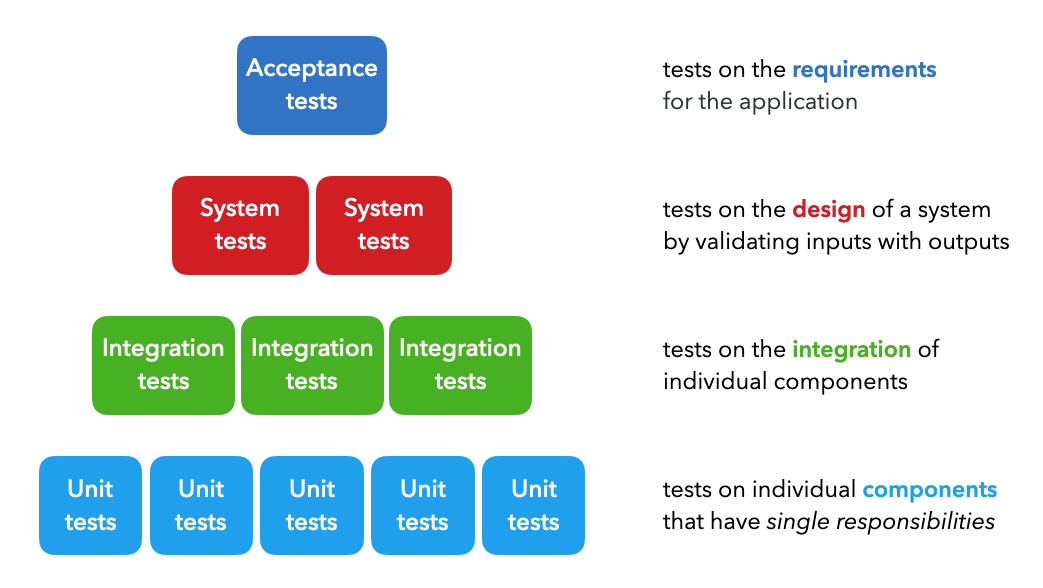
Image Credit: https://madewithml.com/courses/mlops/testing/Other types (under the system testing umbrella)
- Regression tests: ensure that new code changes do not break existing functionality.
- Smoke tests: basic tests to check if the main functionalities of a program work.
- Performance tests: tests to evaluate the speed, responsiveness, and stability of a program under load.
- Security tests: tests to identify vulnerabilities and ensure data protection.
Testing tools in Python
- Don’t rely on
print()statements for testing - Use testing tools like
unittest,pytest, ornose2 - These tools provide built-in functionality including parameterisation, filters, etc.
- These tools can be integrated into CI/CD pipelines for automated testing
- These tools don’t pollute the main codebase; tests are in separate files
How should we test - Arrange Act Assert (AAA) Methodology
Arrange: set up the test data and environmentAct: execute the code being testedAssert: verify that the output is as expected
Using pytest
- By default, pytest expects tests to be organised under a
testsdirectory, with test files namedtest_*.py - Each test function should be named
test_*
Code Testing
example
what is assert in Python?
assertis a keyword in Python used for debugging purposes- It tests if a condition is true; if not, it raises an
AssertionError
Three key features of pytest
- parametrize
- Fixtures
- Markers
- Why? Aim to reduce redundancy and to automate test setup
parametrize
- Use
@pytest.mark.parametrizeto run the same test with different inputs - Helps reduce code redundancy; similar to loops but better reporting
Fixtures
- Use
@pytest.fixtureto set up reusable test data or state - Reduce redundancy across different test functions
Fixtures (cont)
- So the fixtures of data_loc and preprocessor can be used in any test file under
tests/code/
Markers
- Sometimes we want to run only a subset of tests; pytest provides various levels of granularity
Markers (cont)
- More advacend: can use
@pytest.mark.<name>to label tests and create groups
- Then run tests with specific markers
Data testing
Purpose
- Data from various resources: local file systems, databases, APIs
- Need to test data validity before using it for training/inference
Great expectationslibrary allows to create expectations and to compare with data
Example
- Create a fixture to load data
Create expectations
# tests/data/test_dataset.py
def test_dataset(df):
    """Test dataset quality and integrity."""
    column_list = ["id", "created_on", "title", "description", "tag"]
    df.expect_table_columns_to_match_ordered_list(column_list=column_list)  # schema adherence
    tags = ["computer-vision", "natural-language-processing", "mlops", "other"]
    df.expect_column_values_to_be_in_set(column="tag", value_set=tags)  # expected labels
    df.expect_compound_columns_to_be_unique(column_list=["title", "description"])  # data leaks
    df.expect_column_values_to_not_be_null(column="tag")  # missing values
    df.expect_column_values_to_be_unique(column="id")  # unique values
    df.expect_column_values_to_be_of_type(column="title", type_="str")  # type adherence

    # Expectation suite
    expectation_suite = df.get_expectation_suite(discard_failed_expectations=False)
    results = df.validate(expectation_suite=expectation_suite, only_return_failures=True).to_json_dict()
    assert results["success"]
Check expectations
- Can run these data tests like a code test
Other expectations
- This library provides many built-in expectations, e.g.,
expect_column_pair_values_a_to_be_greater_than_bexpect_column_mean_to_be_between
Model testing
Purpose
- Want to write tests when we develop training pipelines so we can catch errors quickly
- ML systems can run to completion without throwing errors, but produce invalid results
- We want to catch errors quickly to save on time and compute
Example of testing a neural network
- Check shapes and values of model output
- Check overfitting on a batch (the logic is - if the model cannot overfit on a small batch, there is likely a bug)
Example of testing a neural network (cont)
- Train to completion (tests early stopping, saving, etc.)
- On different devices
Key references
Summary
- Code testing is essential for ensuring code correctness and reliability
- using testing frameworks including pytest and great_expectations helps organise and automate tests
- Keep testing in mind during development and all stages of the ML lifecycle

© CASA | ucl.ac.uk/bartlett/casa